
Help panel in Sage 200
When you open a screen, the help panel on the right shows you information and common tasks for that screen.
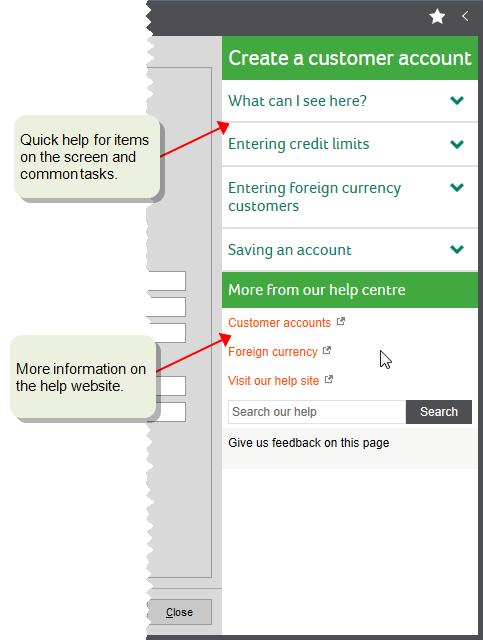
You can show and hide the help panel:
-
To hide the panel, click
 Hide User Assistance.
 -
To show the panel, click
 Show User Assistance.
Product help on this website
You're currently reading the product help website, and this is where you can get more detailed information and watch videos.
To open this help from Sage 200:
-
Press F1 for help on the current window.
-
Click
Help in the top right of the Sage 200 desktop. -
Click the help links at the bottom of the help panel.
Search product help
Search results are displayed in order of relevance.
-
Don't type a full question, such as how to do I enter an invoice.
instead, just type a few key words like enter invoice, as the results show pages that contain all the words in any order.
-
Use double quotes "" to find the exact phrase, for example "credit note".
-
Use the Filter button in the search bar to narrow down your results.
-
You can also include or exclude words.
-
Use or or | to search for either one word or another word, for example sales or purchase.
-
Use not, ! or ^ before a word to search for topics that don't contain that word. For example, enter sales ^ order to find "sales" but not "order".
-
Use brackets () to combine any of the above conditions. For example, enter (sales or purchase) not order to find either "sales" or "purchase", but not "order".
-
Sage Search help
Sage Search help is a dedicated AI-powered agent that generates answers based on a range of Sage's help and support resources.
See Sage Search help.
Find help for other applications
To find help for other Sage 200 applications, refer to the help supplied with that product.
-
Web Portal: Select the help icon in the application.
See the Web Portal help (opens in a new tab).
-
Report Designer: Press F1 for help, or select Help from the menu.
The product help available in Report Designer is also available online, see Report Designer help (opens in a new tab).
You can find a large number Report Designer articles in the Sage Knowledgebase, see Get more help with Report Designer.